
How it will work
Question 1 asks if this is right.
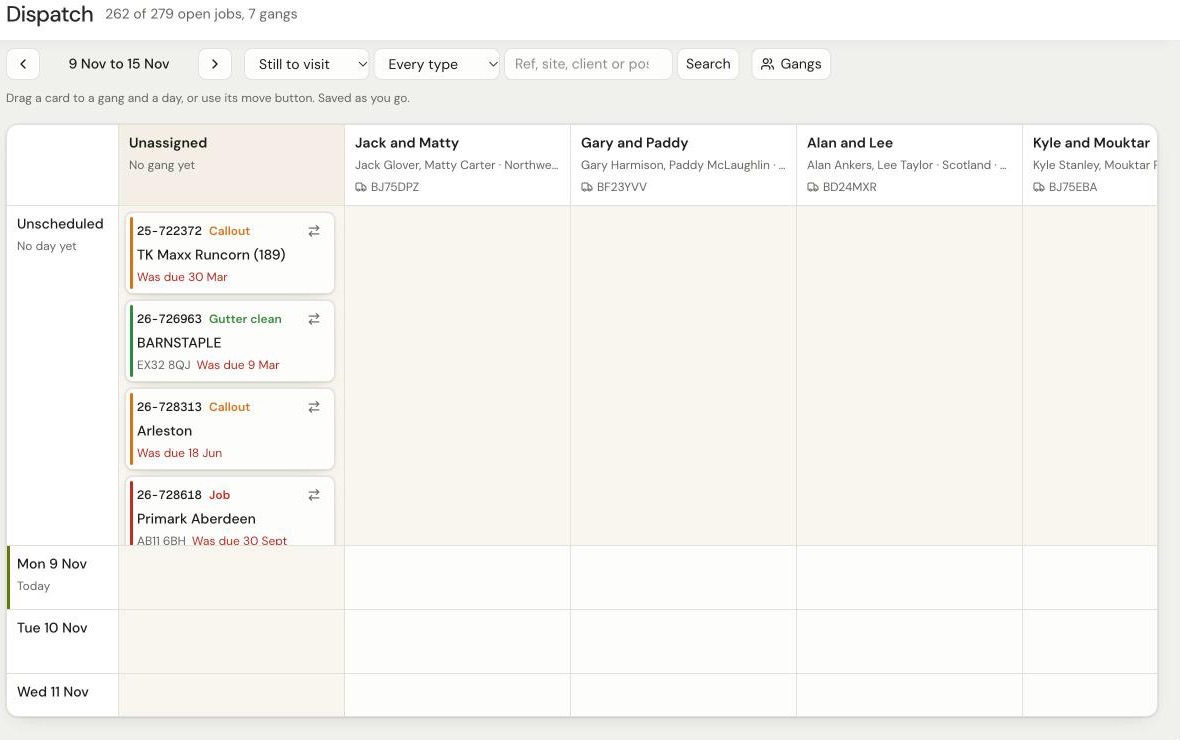
- Jobs board, map and vans
- Your notes, who's on it, chases
- Day plan and routes
- Gutter clean schedule
Tap your answer. If anything's different, type it or add a screenshot.
Is that how you want it to work?
The picture above.
What we found
Already in the app this morning: your 82 notes and "Assigned to" names from NEW JOBS & COs, and all 267 stores from your gutter app, up to date to 5 Nov.
When you give a job to a gang, what do you change in SwiftCase?
Tap all that apply. A screenshot of the screen helps.
What we found
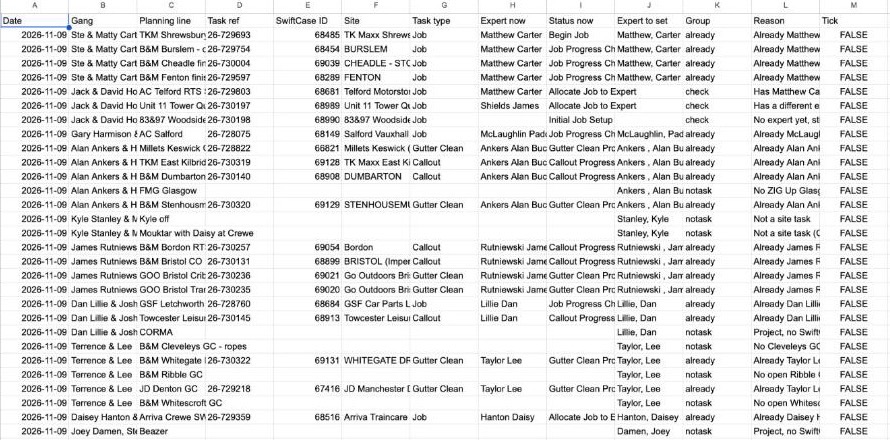
Your Allocations tab already works out the "Expert to set" for each planned job. In SwiftCase a job waits at "Allocate Job to Expert" until someone sets the Expert.
Example: 26-729693 TK Maxx Shrewsbury has Expert Matthew Carter and is now at "Begin Job".
Setting the Expert from the app needs SwiftCase's makers to switch it on. We have asked them.
What else should the app put into SwiftCase?
Anything the office or the lads need to see there.
What we found
- Job on hold: SwiftCase shows it on hold, with a date and reason.
- Job cancelled: it leaves the live list in SwiftCase.
- Planned date: the day it is on your plan, written onto the job.
- Notes for the office: your note written onto the job in SwiftCase.
Anything you don't tick stays in the app only.
Is every 30 minutes, weekdays 7am to 5:30pm, enough?
How up to date your jobs list is.
What we found
SwiftCase's makers asked us on 6 Nov to ease off how often we check. Every 30 minutes in working hours is what we agreed with them. Adding Saturdays or longer hours is fine. Checking more often than every 30 minutes needs their OK.
Who else looks at or edits your sheets?
They'll need a login to the app.
What we found
Names in the "Assigned to" column of your NEW JOBS & COs sheet today:
| Name | Jobs |
|---|---|
| Luke | 19 |
| Gary | 17 |
| Brandon | 12 |
| Sean | 2 |
| Supervisors | 1 |
Grace appears in your notes ("grace sorting with client").
What from Planning 2026 do you need in the app?
Tap all that apply. A screenshot helps.
What we found
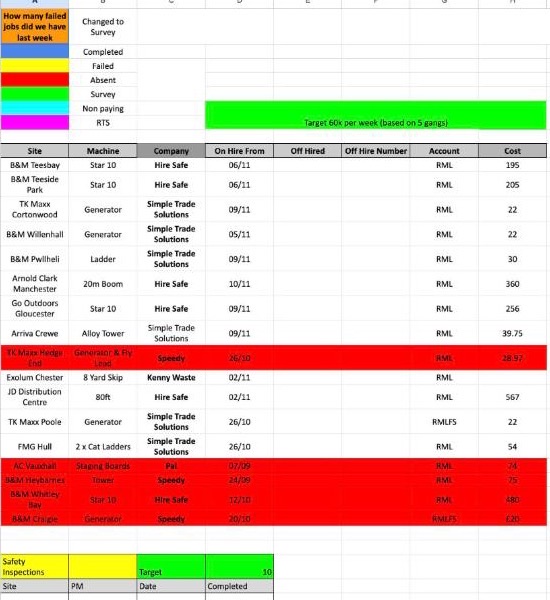
Your 9 November tab has more than the plan. The app's Dispatch screen (question 1) has the gang and day plan only: no £ targets, plant hire, inspections or colours yet.
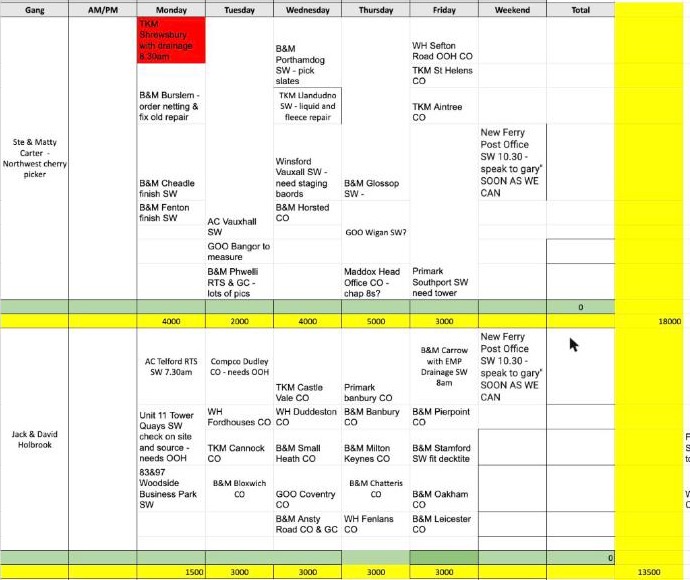
Jack and David aren't on SwiftCase. Whose name should their jobs go under?
Every gang needs one SwiftCase name as its Expert.
What we found
Neither Jack nor David is a SwiftCase user yet, so jobs can't go under their names. Your Gang experts tab says "Jack Glover: Not a SwiftCase user yet", and David Holbrook isn't on SwiftCase's Expert list.
Their jobs this week are under other names now:
| Job | Site | Expert now |
|---|---|---|
| 26-729803 | Telford | Matthew Carter |
| 26-730197 | Unit 11 Tower Quays | James Shields |
| 26-730198 | 83&97 Woodside | None |
Is B&M Picton Court the same store as B&M Bridgend?
Your gutter app has it with a Carlisle postcode.
What we found
| Where | Name | Postcode |
|---|---|---|
| Your gutter app | B&M Picton Court (906), once a year, no clean logged | CA3 8PU, Carlisle |
| Your gutter app | B&M Bridgend (364) | CF31 3XX |
| SwiftCase | PICTON COURT, Unit 1 Picton Court Retail Park, Bridgend (job 26-729987, Oct) | CF31 3XX |
Best day for 20 minutes to check it before you switch?
After that you can stop using your sheets.
What we found
On the day we copy in your latest notes, gutter cleans and that week's plan. You spend 20 minutes checking it with us, then stop using the sheets.
Anything else?
Anything you do that the app doesn't, or screenshots of your sheets.